What makes a shell script a shell script?
The beauty of shell scripting! No need for a complex development environment installed.
You just need a terminal and your favorite editor!
First, create a textfile with your favorite editor, mine is vim
In a terminal type:
vim ~/script.sh
We named it with the .sh extension so that vim will take care of the syntax highlighting.
Syntax highlighting makes debugging easier.
The first line should be pointing to the shell interpreter using an absolute path.
Like this:
#!/bin/bash
or this version
#!/usr/bin/env bash
in this case we use the env command to search for the bash interpreter and execute it there.
The advantage could be that it is in another location but will run anyways.
Lets add another line of text to the script
#!/usr/bin/env bash
echo "This is a shell script"
Save it
Now we need to make it executable with the chmod command:
chmod u+x script.sh
This allows us to run the script as if it was a command.
To make it more seamless is to put our command in the systempath.
Depending on your OS, but for Rocky Linux the folder for this is ~/bin
So we need to move the script to ~/bin
mv script.sh ~/bin
When that is done you can run the script from anywhere
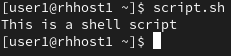
Please note that none of this steps is required to run a text file as a shell script.
You can create a script by providing the content as an argument to bash, like this oneliner:
echo 'echo this is a shell script' > ´~/bin/script2.sh
Then run it with:
bash ~/bin/script2.sh